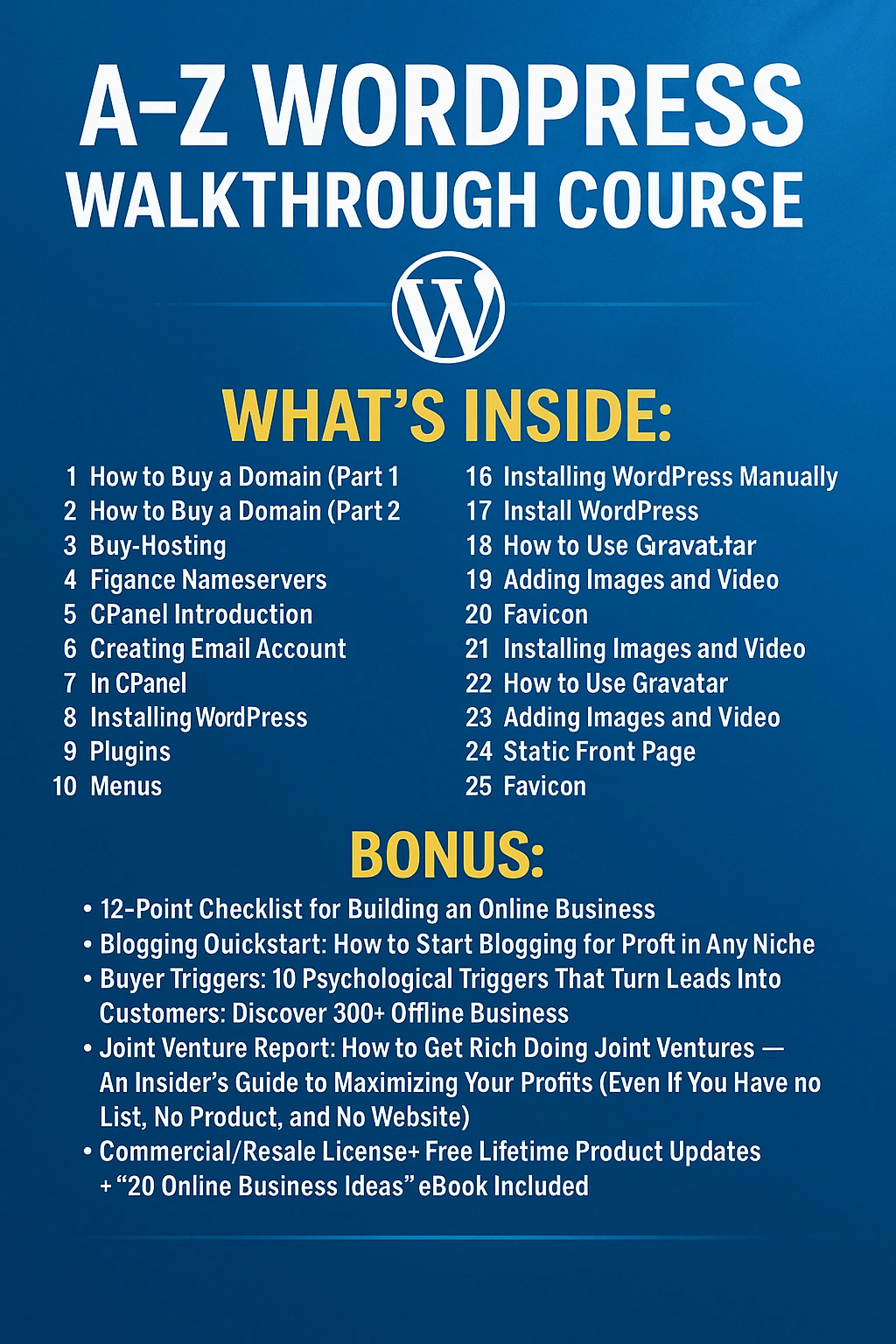
A-Z WORDPRESS WALKTHROUGH COURSE
Build. Launch. Grow.
INTRODUCING: A-Z WordPress Walkthrough Course — the execution-ready, beginner-to-pro system that takes you from buying a domain to launching a tracked, secure, and scalable WordPress site—without tech overwhelm, guesswork, or costly agency fees.
Your 3-Part USP
⚡ Instant Digital Download | ♾️ Lifetime Access & Updates | ? Commercial/Resale License Included
[ ✅ YES—UNLOCK THE A-Z WORDPRESS COURSE NOW → ]
❌ THE PROBLEM: “I want a site… but everything feels confusing and risky.”
Sound familiar?
“Domains, hosting, nameservers—where do I even start?”
“I installed WordPress, but the dashboard looks like a cockpit.”
“Pages, posts, themes, plugins, menus, widgets… I’m lost.”
“I’m afraid I’ll break something—or worse, make it slow or insecure.”
“I want Google Analytics, contact forms, and a pro look—without hiring anyone.”
You’re likely:
Stuck in YouTube rabbit holes with outdated tutorials
Paying monthly for themes/plugins you don’t need
Shipping nothing because you don’t have a linear, do-this-then-that system
Missing leads because your site has no opt-in, no forms, and no tracking
? You’ve got the vision. Now get the step-by-step that turns it into a live, polished site.
? THE AGITATION: The hidden cost of “trial-and-error” DIY
⏳ Time drain: hours lost clicking around settings you don’t understand
? Money wasted: buying tools you’ll never use (or can’t configure)
? Avoidable mistakes: broken themes, plugin conflicts, bad UX, no backups
? Slow performance: misconfigured hosting and media kill conversions
? No data: launching without Analytics means you can’t improve what matters
Every week your website isn’t live is traffic, leads, and sales you’ll never get back.
✅ THE SOLUTION: A-Z WordPress Walkthrough Course
A comprehensive, start-to-finish video system that takes you from domain purchase to a fully configured WordPress site—with clean design, proper structure, essential plugins, forms, navigation, and analytics.
? What You Get (31 Action-Focused Video Lessons)
How to Buy Domain (Part 1) – search, shortlisting, brand checks
How to Buy Domain (Part 2) – purchase options, privacy, DNS overview
Buy Hosting – shared vs. managed, SSL, speed, security must-haves
Site Redirection – www/non-www, HTTP→HTTPS, canonical setup
Change Nameserver – point domain to host the right way
cPanel Introduction – file manager, databases, backups, security basics
Create Email Account from cPanel – brand email + device setup
Installing WordPress Manually – database, wp-config, file upload
Install WordPress in cPanel (Auto Installer) – one-click, secure configs
Make & Edit Post (Block Editor) – Gutenberg blocks, categories, tags
Make & Edit Content (Classic Editor) – classic UI for legacy lovers
WordPress Dashboard Overview – settings, updates, profiles
Tags & Categories – content architecture for SEO & UX
Add Media – images, compression, alt text, media organization
Add & Edit Pages – Home, About, Contact, Legal pages fast
WordPress Comments – moderation, anti-spam, engagement
WordPress Theme – choose, install, and activate safely
Theme Customization – colors, typography, header/footer, site icon
Theme Editor – child themes, safe edits, don’ts that break sites
Plugins – essentials, installation, updates, conflict prevention
Menus – primary/secondary menus, sticky nav, footer links
Widgets – sidebars, footers, calls-to-action that convert
Users – roles, permissions, secure access, author bios
Tools – import/export, site health, backups
Settings – permalinks, reading, discussion, privacy
Contact Form – build a lead-ready form and anti-spam protections
How to Use Gravatar – author identity and trust
Adding Image & Video – embeds, lazy loading, performance
Static Page – set a custom homepage & blog page
Favicon – brand polish that improves recognition
Installing Google Analytics – GA4 setup, basic events, sanity checks
? Bonuses (Included)
12-Point Checklist For Building An Online Business
Blogging Quickstart: Start Blogging for Profit in Any Niche
Buyer Triggers: 10 Psychological Triggers that Turn Leads Into Customers
Discover 300+ Offline Business Words (copy angles & hooks)
Joint Venture Report: Get Rich with JVs (even with no list/product/site)
20 Online Business Ideas
Commercial/Resale License + Unlimited Downloads + FREE Lifetime Product Updates + Premium Support
? BENEFITS YOU CAN EXPECT
Launch faster: go from zero to a live, tracked, lead-ready site in days
Look professional: theme customization + favicon + clean navigation
Capture leads: contact form best practices + trust-boosting details
Stay secure: roles, updates, backups, and smart plugin choices
Rank & measure: SEO-friendly structure + GA4 for real insights
Scale with confidence: a site you understand (and can improve)
Value-packed beyond belief. Hiring freelancers to do just parts of this easily exceeds $700—this gives you the whole build system, forever.
? WHAT’S INSIDE THIS COURSE (Deep-Dive Highlights)Foundations & Setup
Buy domains like a pro: brandability, availability, future-proofing
Hosting that won’t bite: speed, uptime, security, support
WordPress Mastery
Dashboard fluency so nothing feels scary again
Pages vs. posts, categories vs. tags, menus vs. widgets—clear and simple
Design & UX
Theme selection, customization, and when to use a child theme
Readable typography, accessible colors, and mobile-first spacing
Plugins, Performance & Safety
Only what you need: essential plugins without bloat
Avoid conflicts: safe update strategy + site health checks
Lead Gen & Analytics
Build high-converting contact forms (anti-spam included)
Install GA4 and validate the data you’re collecting
✏️ GET INSTANT ACCESS NOW
Launch your site with clarity. Build once—improve forever.
[ ? ENROLL IN A-Z WORDPRESS WALKTHROUGH COURSE → ]
? RESULTS YOU CAN EXPECT (Quantified)
Day 1: Domain + hosting + nameservers done
Day 2: WordPress installed, core pages created, theme customized
Day 3: Menus/widgets set, contact form live, GA4 tracking enabled
Week 1: First posts published, categories/tags structured, site indexed
Ongoing: Faster publishing, higher trust, more inquiries and sales
? WHO THIS COURSE IS FOR
Beginners & Non-Tech Founders who want full control without confusion
Bloggers & Content Creators who need a site that’s easy to publish on
Freelancers & Agencies standardizing client site builds
Local Businesses & Nonprofits launching with limited budgets
Course Creators & Coaches who want a fast funnel-ready site
E-commerce Starters preparing for later WooCommerce scale-up
? OBJECTIONS? LET’S PUT THEM TO REST
“I’m not technical.”
Perfect. This course assumes zero experience. Follow the videos step-by-step.
“I tried before and got stuck.”
We’re linear. Each lesson ends with a done checkpoint—no dead ends.
“Will my site look professional?”
Yes. We guide theme customization, favicon, menus, and layout polish.
“What if I break something?”
You’ll set up basics the safe way—backups, updates, and role management.
“Do I need to pay for expensive plugins?”
No. We focus on essentials and free-first options (upgrades are optional).
“Will it help with SEO and analytics?”
You’ll structure content properly and install GA4 to measure what matters.
“Can I use this for clients?”
Yes—your Commercial/Resale License allows client builds and packaged services (respect the terms).
? VALUE VS PRICE — WHY THIS IS WORTH 7–10×
Agency setup (basic brochure site) ………………… $500–$1,500
Theme/plugin shopping mistakes ……………………… $100–$300
Lost time & opportunities ………………………………… Priceless
Your value stack:
ITEMVALUEFull A-Z WordPress Walkthrough Course (31 lessons)$497Theme/UX quick-start & child theme safety$97Essential plugin stack (no bloat)$97Form, menu & widget conversion patterns$127GA4 install & sanity-check walkthrough$97Bonus Bundle (all 6 items)$197Total Real-World Value$1,112Today’s One-Time PriceSee current price
[ ✅ GET LIFETIME ACCESS—START BUILDING NOW → ]
? WHAT OTHERS ARE SAYING
“I spent months circling WordPress. This got me live in 3 days—with tracking.” — Emilia N., Coach
“No fluff. I finally understand menus, widgets, and forms. Leads are flowing.” — Rashid K., Local Business Owner
“The plugin guidance saved my site from bloat. Pages are snappy now.” — Hannah S., Blogger
“We turned this into a client setup SOP and cut build time in half.” — Marco P., Freelancer
? FINAL CALL TO ACTION
Get Instant Lifetime Access—Launch a Clean, Fast, Lead-Ready WordPress Site
✅ Beginner-friendly videos with checkpoints
✅ Professional design polish without code
✅ Forms, menus, analytics—done right
✅ Commercial/Resale License + Lifetime Updates
[ ? YES—ADD A-Z WORDPRESS WALKTHROUGH COURSE TO CART → ]
USP (Repeat)
⚡ Instant Digital Download | ♾️ Lifetime Access & Updates | ? Commercial/Resale License
[ ✅ I’M READY—START NOW → ]
FAQs (7 Most Asked)
1) Is this truly beginner-friendly?
Yes. No prior experience required. We start at domain purchase and guide you to launch—step by step—with visual checkpoints.
2) What tools do I need?
A domain and hosting. We show free-first plugin choices; premium tools are optional.
3) Will my site be mobile-friendly and fast?
You’ll learn theme selection, media optimization, and bloat-free plugins for speed and responsive design.
4) Can I use this to build client sites?
Yes. Your Commercial/Resale License lets you use the system for clients (respect the license and third-party terms).
5) How do I make sure it’s safe and future-proof?
You’ll master updates, user roles, backups, and sane plugin practices to avoid conflicts.
6) Does the course include analytics?
Yes—complete GA4 setup with real-time verification and basic events so you know what’s working.
7) What if I get stuck?
You have lifetime access to updates and premium support. Rewatch any lesson anytime
Published:
Apr 07, 2026 06:23 AM
Version:
Category:
Course License / Usage Rights:
Course Industry:
Course File Format / Delivery Type:
Course Difficulty/Skill Level:
BeginnerCourse Tags/Use Cases:
Course Target Users:
Course Payment / Access Model:
Tags: